A tool for authorised certifiers.
Signeta supplies templates and document tools. You provide the professional authority, inspect the original and complete certification according to the applicable requirements.
Prelaunch information describes intended release behaviour. Public availability has not been confirmed.
Prepare documents for
certification using your device
Always check the recipient’s requirements for certified documents.
Help with printingStart with the requirements
Confirm the recipient’s instructions and your authority for this profession, jurisdiction and task. Check what must be signed and any specific recipient requirements.
Save details. Select wording.
Use accurate professional details and commonly used jurisdiction wording, or save custom wording. Review it for the actual procedure.
Scan or import. Position the block.
Choose Stamp for wet-ink signing, capture or import the document, then move the certification block to a suitable page.
Review and print the unsigned PDF
Check every page, wording, date and placement. Choose Print for Wet-Ink Signing or Share PDF for Printing. Check the actual printed result.
Inspect the original. Complete in ink.
Compare the copy with the original as required. Complete certification and sign the physical paper. Add any required page signatures or initials separately.
Your professional details.
Space for your signature.
A plain black certification block, with the details that matter.
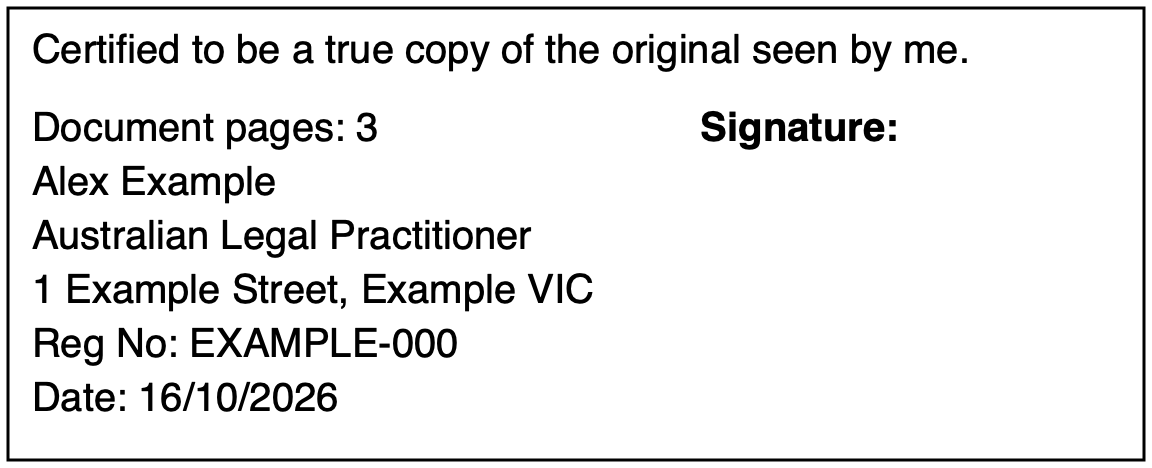
- 01 · Wording
- Commonly used jurisdiction-specific certification text or your saved custom wording. Review for your procedure.
- 02 · Certifier details
- Name, occupation, address and optional registration no. Confirm your saved address matches the sighting location where required (such as Tasmania). Fictional values are shown here.
- 03 · Session details
- Session date and, for multipage copies, document page count. Check the date against actual certification.
- 04 · Blank signature area
- Reserved for completion on paper. This example is unsigned preparation.
There is one saved profile and one block on the selected page. No dedicated phone field, default photo-likeness declaration, automatic page initials or recipient compliance checker is provided. The decorative Signeta S is an app brand, not an official seal, professional credential or evidence of notarisation.
Optional, subject to acceptance
Drawn electronic signature.
Signeta embeds a signature drawn on your device into the PDF. It is not a certificate-based digital signature. Confirm that the recipient accepts the certification and signature method before use.
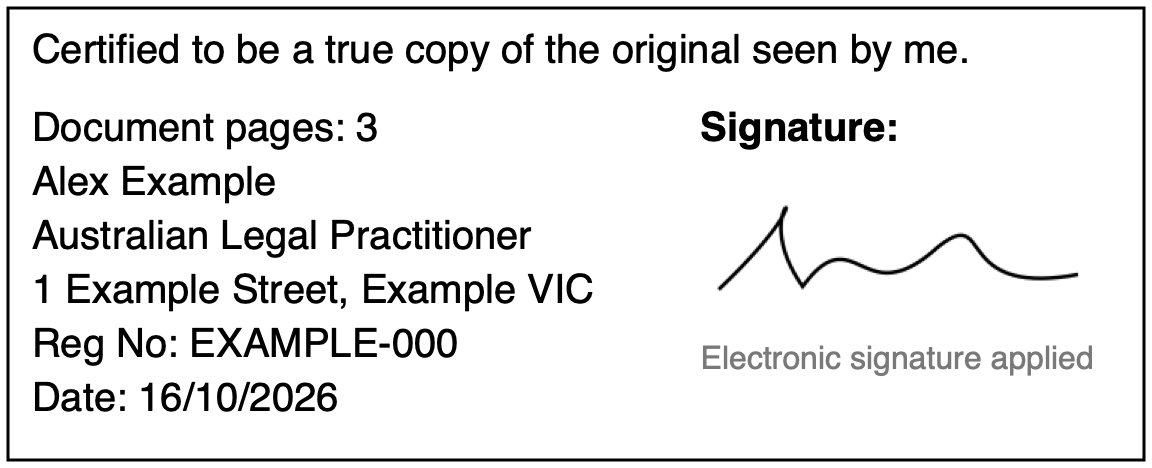
Check the method before signing.
Choose Sign Electronically and draw your signature on your device. Signeta opens the signed Final PDF for review before sharing or saving, or you can return to the preview and choose Print Signed PDF.
Printing an electronic signature does not make it wet ink. A recipient’s PDF upload facility alone does not establish acceptance of electronic certification.
The tool prepares.
The authorised person certifies.
Check the copy and the original
Copy certification confirms the copy’s likeness with the original. It does not establish that the underlying document or its contents are authentic or true.
Follow the particular procedure
Authority, wording, recency, contact details, original sighting, photo statements, page signatures and submission methods can all vary. A profession listed in the app does not establish eligibility for every task.
Keep the scope clear
Signeta does not provide the execution or witnessing process for affidavits or statutory declarations. Templates and custom text do not guarantee compliance or recipient acceptance.
Coming to the App Store
Your certification stamp, on iPhone and iPad.
Copy preparation modernised.
Explore the workflow For authorised certifiers. Check the original, your authority and the recipient’s requirements.